
Free Windows utility
Free File Encryptor
Free File Encryptor is a small desktop app that encrypts and decrypts files on your computer using a passcode you choose. It is built for simple local file protection without accounts, subscriptions, or cloud storage.
Important warning
Lost passcodes cannot be recovered. Keep your passcode somewhere safe before encrypting important files.
Local by design
Files are processed on your computer. The app does not require an account and does not upload your files to the cloud.
Simple workflow
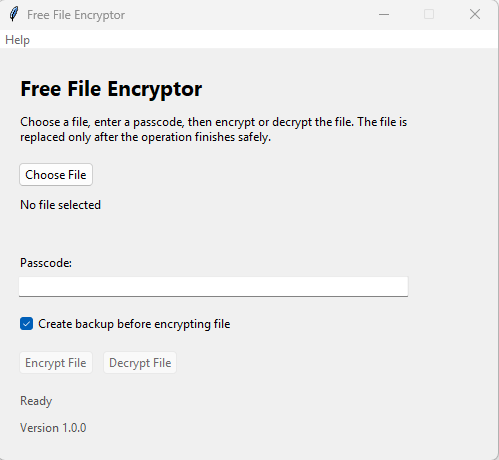
Choose a file or drag one into the app, enter a passcode, then click Encrypt or Decrypt.
Backup option
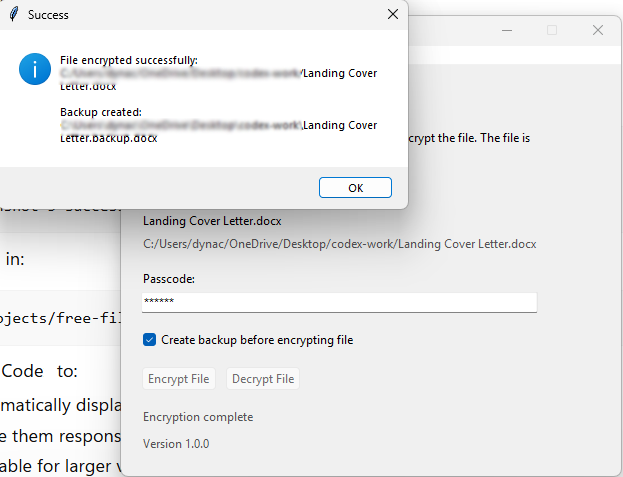
Before encrypting, the app can create a backup copy so you have an untouched original.
How To Use
-
1. Download and open the app.
Run the Windows executable from a folder you trust.
-
2. Select a file.
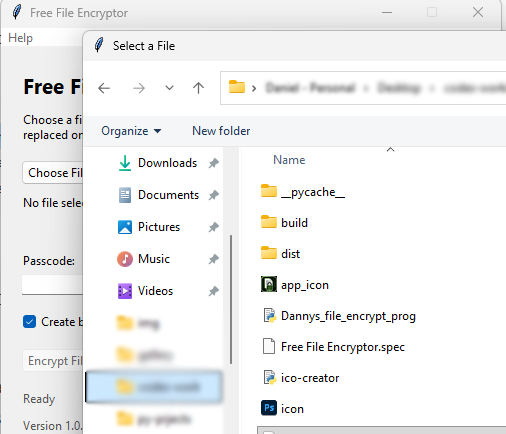
Use the Choose File button or drag and drop a file into the window.
-
3. Enter a passcode.
Use a passcode you can remember. You will need the exact same passcode to decrypt.
-
4. Encrypt or decrypt.
Click the matching action. Keep backups until you have verified your files.
App preview
Screenshots
Click any screenshot to open the full-size image in your browser.
Python source
Copy the Python Code
Copy this code into IDLE, save it as a .py file, and run it.
import base64
import hashlib
import os
import shutil
import sys
import tempfile
from tkinter import BooleanVar, Menu, StringVar, TclError, Tk, filedialog, messagebox
from tkinter import ttk

from cryptography.fernet import Fernet, InvalidToken

try:
    from tkinterdnd2 import DND_FILES, TkinterDnD
except ImportError:
    DND_FILES = None
    TkinterDnD = None


APP_NAME = "Free File Encryptor"
APP_VERSION = "1.0.0"
APP_ICON_FILENAME = "app_icon.ico"
WINDOW_MIN_WIDTH = 500
WINDOW_MIN_HEIGHT = 410
BACKUP_NAME_LIMIT = 240
TEMP_FILE_PREFIX = ".dfe-"

# PyInstaller build notes for Windows:
# Basic GUI executable:
#     pyinstaller --onefile --windowed --name "Free File Encryptor" Dannys_file_encrypt_prog.py
#
# Optional icon setup:
# - Place app_icon.ico beside this script as the placeholder application icon.
# - To set the EXE icon, build with:
#     pyinstaller --onefile --windowed --name "Free File Encryptor" --icon app_icon.ico Dannys_file_encrypt_prog.py
# - To also bundle the icon for Tkinter's window icon, add:
#     --add-data "app_icon.ico;."
#
# Optional drag-and-drop support:
# - Install tkinterdnd2 to allow dropping files onto the window:
#     pip install tkinterdnd2
# - If tkinterdnd2 is unavailable, the app still works with the Choose File button.
#

def resource_path(relative_path):
    """Return an asset path that works in source and PyInstaller builds."""
    base_path = getattr(sys, "_MEIPASS", os.path.dirname(os.path.abspath(__file__)))
    return os.path.join(base_path, relative_path)


def set_application_icon(root):
    """Use app_icon.ico when present, but do not fail if it is missing."""
    icon_path = resource_path(APP_ICON_FILENAME)

    if not os.path.exists(icon_path):
        return

    try:
        root.iconbitmap(icon_path)
    except TclError:
        # A bad or unsupported icon should not prevent the app from opening.
        pass


def create_root_window():
    """Create a Tk root with drag-and-drop support when available."""
    if TkinterDnD is not None:
        try:
            return TkinterDnD.Tk()
        except TclError:
            pass

    return Tk()


def generate_key(passcode):
    """Create a stable Fernet key from the user's passcode."""
    if not isinstance(passcode, str) or not passcode.strip():
        raise ValueError("Passcode cannot be empty.")

    # Fernet needs 32 raw bytes encoded with URL-safe base64.
    # SHA-256 turns the same passcode into the same 32-byte digest each time.
    passcode_bytes = passcode.encode("utf-8")
    digest = hashlib.sha256(passcode_bytes).digest()
    return base64.urlsafe_b64encode(digest)


def remove_file_if_exists(filename):
    """Best-effort cleanup for temporary or failed backup files."""
    if not filename or not os.path.exists(filename):
        return

    try:
        os.remove(filename)
    except OSError:
        pass


def write_file_safely(filename, file_data):
    """Replace a file only after the new contents are fully written."""
    temp_filename = None
    directory = os.path.dirname(os.path.abspath(filename))

    try:
        # Keep the temp file in the same folder so os.replace stays atomic on
        # the same filesystem. Use a short prefix to tolerate long filenames.
        with tempfile.NamedTemporaryFile(
            mode='wb',
            delete=False,
            dir=directory,
            prefix=TEMP_FILE_PREFIX,
            suffix=".tmp",
        ) as temp_file:
            temp_filename = temp_file.name
            temp_file.write(file_data)
            temp_file.flush()
            os.fsync(temp_file.fileno())

        # The original file is replaced only after the temp file was written.
        os.replace(temp_filename, filename)
        temp_filename = None
    finally:
        # If anything fails before replacement, remove the leftover temp file.
        remove_file_if_exists(temp_filename)


def get_backup_filename(filename):
    """Build a unique backup name without overwriting existing backups."""
    directory = os.path.dirname(os.path.abspath(filename))
    basename = os.path.basename(filename)
    name, extension = os.path.splitext(basename)
    max_name_length = max(1, BACKUP_NAME_LIMIT - len(".backup") - len(extension))
    name = name[:max_name_length]

    backup_filename = os.path.join(directory, f"{name}.backup{extension}")
    counter = 1

    while os.path.exists(backup_filename):
        suffix = f".backup.{counter}"
        max_name_length = max(1, BACKUP_NAME_LIMIT - len(suffix) - len(extension))
        backup_name = name[:max_name_length]
        backup_filename = os.path.join(
            directory,
            f"{backup_name}{suffix}{extension}",
        )
        counter += 1

    return backup_filename


def create_file_backup(filename):
    """Copy the original file before changing it."""
    backup_filename = get_backup_filename(filename)

    try:
        shutil.copy2(filename, backup_filename)
    except OSError:
        remove_file_if_exists(backup_filename)
        raise

    return backup_filename


def add_backup_message(message, backup_filename):
    """Include backup details in the success message when one was created."""
    if backup_filename:
        return f"{message}\n\nBackup created:\n{backup_filename}"

    return message


def transform_file(
    filename,
    passcode,
    transform_data,
    success_message,
    should_create_backup=True,
):
    """Apply encryption/decryption bytes and safely replace the original file."""
    backup_filename = None

    try:
        key = generate_key(passcode)
        cipher = Fernet(key)

        with open(filename, 'rb') as file:
            file_data = file.read()

        transformed_data = transform_data(cipher, file_data)

        # If enabled, copy the original before the safe replacement step.
        if should_create_backup:
            backup_filename = create_file_backup(filename)

        try:
            write_file_safely(filename, transformed_data)
        except OSError:
            remove_file_if_exists(backup_filename)
            raise

        message = f"{success_message}:\n{filename}"
        return True, add_backup_message(message, backup_filename)
    except ValueError as error:
        return False, f"Invalid passcode: {error}"
    except InvalidToken:
        return False, (
            "Decryption failed. The passcode may be incorrect, "
            "or the file may not be encrypted by this program."
        )
    except OSError as error:
        return False, f"Could not read or write file {filename}: {error}"


# Encrypt the file
def encrypt_file(filename, passcode, should_create_backup=True):
    return transform_file(
        filename,
        passcode,
        lambda cipher, file_data: cipher.encrypt(file_data),
        "File encrypted successfully",
        should_create_backup,
    )


# Decrypt the file
def decrypt_file(filename, passcode, should_create_backup=False):
    # Keep this argument for compatibility, but backups are encryption-only.
    del should_create_backup

    return transform_file(
        filename,
        passcode,
        lambda cipher, file_data: cipher.decrypt(file_data),
        "File decrypted successfully",
        False,
    )


class FileEncryptorApp:
    """Small Tkinter GUI wrapper for the file encryption helpers."""

    def __init__(self, root):
        self.root = root
        self.root.title(APP_NAME)
        self.root.minsize(WINDOW_MIN_WIDTH, WINDOW_MIN_HEIGHT)
        self.root.resizable(False, False)
        set_application_icon(self.root)
        self.drag_and_drop_available = (
            DND_FILES is not None and hasattr(self.root, "drop_target_register")
        )

        self.selected_file = StringVar()
        self.displayed_filename = StringVar(value="No file selected")
        self.displayed_path = StringVar(value="")
        self.passcode = StringVar()
        self.create_backup = BooleanVar(value=True)
        self.status = StringVar(value="Ready")

        self.encrypt_button = None
        self.decrypt_button = None
        self.choose_button = None
        self.passcode_entry = None
        self.drop_target_widgets = []

        self.build_menu()
        self.build_ui()
        self.setup_drag_and_drop()
        self.selected_file.trace_add("write", self.update_action_buttons)
        self.passcode_entry.focus()

    def build_menu(self):
        """Add a minimal Help menu without changing the main layout."""
        menu_bar = Menu(self.root)
        help_menu = Menu(menu_bar, tearoff=0)
        help_menu.add_command(label="Help / About", command=self.show_help_about)
        menu_bar.add_cascade(label="Help", menu=help_menu)
        self.root.config(menu=menu_bar)

    def build_ui(self):
        """Create and arrange the window widgets."""
        main_frame = ttk.Frame(self.root, padding=20)
        main_frame.grid(row=0, column=0, sticky="nsew")

        title_label = ttk.Label(
            main_frame,
            text=APP_NAME,
            font=("Segoe UI", 16, "bold"),
        )
        title_label.grid(row=0, column=0, columnspan=2, sticky="w", pady=(0, 8))

        description_text = (
            "Choose or drop a file, enter a passcode, then encrypt or decrypt "
            "the file. The file is replaced only after the operation finishes "
            "safely."
        )
        if not self.drag_and_drop_available:
            description_text = (
                "Choose a file, enter a passcode, then encrypt or decrypt the "
                "file. The file is replaced only after the operation finishes "
                "safely."
            )

        description_label = ttk.Label(
            main_frame,
            text=description_text,
            wraplength=430,
            justify="left",
        )
        description_label.grid(row=1, column=0, columnspan=2, sticky="w", pady=(0, 16))

        self.choose_button = ttk.Button(
            main_frame,
            text="Choose File",
            command=self.choose_file,
        )
        self.choose_button.grid(row=2, column=0, sticky="w", pady=(0, 8))

        filename_label = ttk.Label(
            main_frame,
            textvariable=self.displayed_filename,
            wraplength=430,
        )
        filename_label.grid(row=3, column=0, columnspan=2, sticky="w", pady=(0, 4))

        path_label = ttk.Label(
            main_frame,
            textvariable=self.displayed_path,
            wraplength=430,
            foreground="#555555",
        )
        path_label.grid(row=4, column=0, columnspan=2, sticky="w", pady=(0, 16))

        passcode_label = ttk.Label(main_frame, text="Passcode:")
        passcode_label.grid(row=5, column=0, sticky="w", pady=(0, 4))

        self.passcode_entry = ttk.Entry(
            main_frame,
            textvariable=self.passcode,
            show="*",
            width=42,
        )
        self.passcode_entry.grid(
            row=6,
            column=0,
            columnspan=2,
            sticky="ew",
            pady=(0, 16),
        )

        backup_checkbox = ttk.Checkbutton(
            main_frame,
            text="Create backup before encrypting file",
            variable=self.create_backup,
        )
        backup_checkbox.grid(row=7, column=0, columnspan=2, sticky="w", pady=(0, 16))

        button_frame = ttk.Frame(main_frame)
        button_frame.grid(row=8, column=0, columnspan=2, sticky="w", pady=(0, 16))

        self.encrypt_button = ttk.Button(
            button_frame,
            text="Encrypt File",
            command=lambda: self.run_file_action("encrypt"),
            state="disabled",
        )
        self.encrypt_button.grid(row=0, column=0, padx=(0, 8))

        self.decrypt_button = ttk.Button(
            button_frame,
            text="Decrypt File",
            command=lambda: self.run_file_action("decrypt"),
            state="disabled",
        )
        self.decrypt_button.grid(row=0, column=1)

        status_label = ttk.Label(
            main_frame,
            textvariable=self.status,
            foreground="#555555",
        )
        status_label.grid(row=9, column=0, columnspan=2, sticky="w", pady=(0, 8))

        version_label = ttk.Label(
            main_frame,
            text=f"Version {APP_VERSION}",
            foreground="#555555",
        )
        version_label.grid(row=10, column=0, columnspan=2, sticky="w")

        self.drop_target_widgets = [
            self.root,
            main_frame,
            title_label,
            description_label,
            self.choose_button,
            filename_label,
            path_label,
            self.passcode_entry,
            backup_checkbox,
            button_frame,
            self.encrypt_button,
            self.decrypt_button,
            status_label,
            version_label,
        ]

    def show_help_about(self):
        """Show basic usage and safety notes."""
        messagebox.showinfo(
            "Help / About",
            (
                f"{APP_NAME}\n"
                f"Version {APP_VERSION}\n\n"
                "This app encrypts and decrypts a selected file using a "
                "passcode.\n\n"
                "Use the same passcode to decrypt a file that you used to "
                "encrypt it. Lost passcodes cannot be recovered.\n\n"
                "Backups are recommended before encrypting files. The backup "
                "option is enabled by default and applies only to encryption.\n\n"
                "Drag-and-drop file selection is optional and works when "
                "tkinterdnd2 is installed. The Choose File button works even "
                "without tkinterdnd2."
            ),
        )

    def choose_file(self):
        """Let the user choose a file and show filename plus full path."""
        filename = filedialog.askopenfilename(title="Select a File")
        if filename:
            self.select_file(filename)

    def select_file(self, filename):
        """Store the selected file and refresh filename/path labels."""
        if not os.path.exists(filename):
            self.show_error(
                "Invalid File",
                "The selected item does not exist.",
                "Error: file not found",
            )
            return

        if not os.path.isfile(filename):
            self.show_error(
                "Invalid File",
                "Please choose or drop a file, not a folder.",
                "Error: selected item is not a file",
            )
            return

        self.selected_file.set(filename)
        self.displayed_filename.set(os.path.basename(filename))
        self.displayed_path.set(filename)
        self.status.set("File selected")

    def clear_selected_file(self):
        """Reset stale file state when the selected path is no longer usable."""
        self.selected_file.set("")
        self.displayed_filename.set("No file selected")
        self.displayed_path.set("")

    def show_error(self, title, message, status_text):
        """Keep error status labels and message boxes consistent."""
        self.status.set(status_text)
        messagebox.showerror(title, message)

    def setup_drag_and_drop(self):
        """Register file drop handlers when tkinterdnd2 is installed."""
        if not self.drag_and_drop_available:
            return

        try:
            for widget in self.drop_target_widgets:
                widget.drop_target_register(DND_FILES)
                widget.dnd_bind("<<Drop>>", self.handle_file_drop)
        except (AttributeError, TclError):
            # Drag-and-drop is optional; keep normal Tkinter behavior intact.
            self.drag_and_drop_available = False

    def handle_file_drop(self, event):
        """Select the first file dropped onto the application window."""
        dropped_files = self.root.tk.splitlist(event.data)

        if not dropped_files:
            self.status.set("Error: no file dropped")
            return

        self.select_file(dropped_files[0])

    def get_form_values(self):
        """Validate the current UI inputs before running file operations."""
        filename = self.selected_file.get()
        user_passcode = self.passcode.get()

        if not filename:
            self.show_error(
                "No File Selected",
                "Please choose a file first.",
                "Error: no file selected",
            )
            return None, None

        if not os.path.exists(filename):
            self.clear_selected_file()
            self.show_error(
                "File Not Found",
                "The selected file no longer exists. Please choose it again.",
                "Error: file not found",
            )
            return None, None

        if not os.path.isfile(filename):
            self.clear_selected_file()
            self.show_error(
                "Invalid File",
                "The selected path is not a file. Please choose a file.",
                "Error: selected item is not a file",
            )
            return None, None

        if not user_passcode or not user_passcode.strip():
            self.show_error(
                "No Passcode",
                "Please enter a passcode.",
                "Error: passcode required",
            )
            return None, None

        return filename, user_passcode

    def update_action_buttons(self, *_args):
        """Enable file action buttons only when a file is selected."""
        self.set_buttons_enabled(True)

    def set_buttons_enabled(self, enabled):
        """Disable buttons during file operations and restore them afterward."""
        action_state = (
            "normal" if enabled and self.selected_file.get() else "disabled"
        )
        choose_state = "normal" if enabled else "disabled"

        self.choose_button.configure(state=choose_state)
        self.encrypt_button.configure(state=action_state)
        self.decrypt_button.configure(state=action_state)

    def run_file_action(self, action):
        """Run encryption/decryption and report the result in a message box."""
        filename, user_passcode = self.get_form_values()
        if not filename:
            return

        is_encrypting = action == "encrypt"
        self.status.set("Encrypting..." if is_encrypting else "Decrypting...")
        self.set_buttons_enabled(False)
        self.root.update_idletasks()

        try:
            if is_encrypting:
                success, message = encrypt_file(
                    filename,
                    user_passcode,
                    self.create_backup.get(),
                )
                complete_status = "Encryption complete"
                error_status = "Error: encryption failed"
            else:
                success, message = decrypt_file(
                    filename,
                    user_passcode,
                )
                complete_status = "Decryption complete"
                error_status = "Error: decryption failed"

            if success:
                self.status.set(complete_status)
                messagebox.showinfo("Success", message)
            else:
                self.status.set(error_status)
                messagebox.showerror("Error", message)
        except Exception as error:
            self.status.set("Error: unexpected problem")
            messagebox.showerror("Error", f"Unexpected error: {error}")
        finally:
            self.set_buttons_enabled(True)


def main():
    root = create_root_window()
    FileEncryptorApp(root)
    root.mainloop()


if __name__ == "__main__":
    main()
v1.0.0 Changelog
- Initial public Windows release.
- Added file encryption and decryption using passcode-derived keys.
- Added optional drag-and-drop file selection.
- Added backup creation before encryption.
Source Code
Public GitHub and source code links will be added here in a future update.